Funny Voice Reverse
- 4.4
- Rating
- 1.00M
- Installs
- Free
- Price
 Analysis by App-foxy
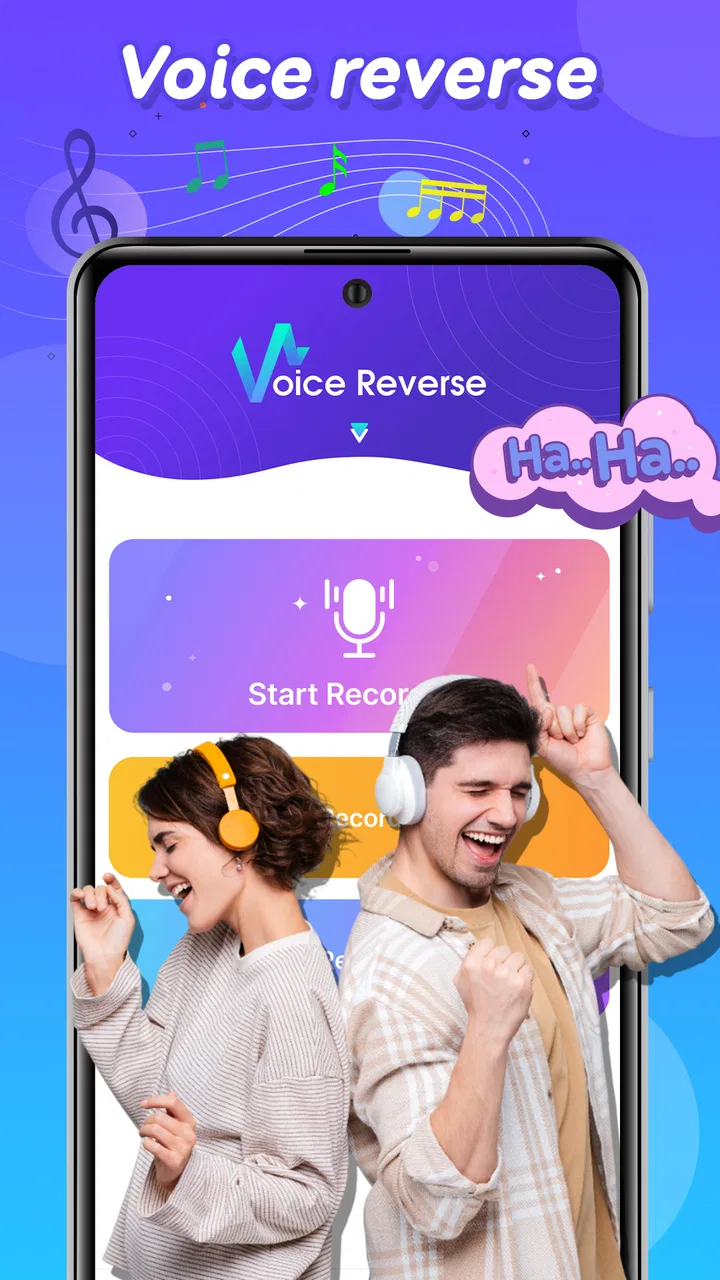
I opened Funny Voice Reverse expecting a quick novelty, and that is exactly where it works best: it turns an ordinary voice recording into a small creative experiment. This free Music & Audio app from BigSoft inc. is built around one clear idea—record something, play it backward, and see what kind of sound appears. The concept is simple, but I found it surprisingly useful when I wanted a playful audio effect without learning a full editor.
It is not trying to replace a serious recording studio or a complete music-production suite. Instead, it sits in the space between a voice recorder and a sound-effects toy. I can imagine using it to make a strange message for a friend, create a short audio cue for a video, or test how a spoken phrase changes when its rhythm and pronunciation are reversed. The best part is the immediate feedback: the distance between recording an idea and hearing the result is very short.
From a quick idea to a backward voice clip
The creative starting point is refreshingly direct. I do not need to begin with a complicated project, choose a track format, or arrange several layers before hearing anything interesting. I can simply think of a phrase, make a recording, and listen to the reversed result. That makes the app especially approachable for people who enjoy experimenting with sound but do not normally use audio software.
You May Also Like

 Blood Strike: 2.5 Anniversary
Blood Strike’s Loadouts Turn Every Drop Into a Tactical Gamble
A close look at Blood Strike’s custom loadouts: how fast access to signature weapons reshapes its battle royale rhythm, rewards preparation, and narrows the gap between fights.

 Pandora - Music & Podcasts
Pandora’s Music Is Easy to Start, but Harder to Recover
Pandora’s strength is its low-effort path from a seed to a station. Its weak spot is how much confidence it asks you to place in connection, setup, and quiet recovery.

 8 Ball Pool
 Is Built on Rivalries, Rematches, and Routine
A close look at the rivalries, rematches, shared routines, and unanswered safety questions that turn a quick pool match into a persistent mobile community.

 Samsung Music
’s Quiet Strength Is Playing What You Already Own
Its reach comes less from spectacle than from dependable access to a personal library. That simplicity is both the app’s strongest retention engine and its ceiling.

 AccuWeather: Weather Radar
AccuWeather Review: A Quick, Clear Forecast for Everyday Decisions
For everyday plans, the best forecast is the one you can understand quickly. AccuWeather makes rain timing, radar, and local conditions easy to act on, with a few trade-offs.

 Hill Climb Racing
Why Hill Climb Racing Still Turns Crashes Into One More Run
A tiny car, a bumpy hill and one more upgrade: Hill Climb Racing keeps resurfacing because its simple chaos makes every near-miss feel personal.
More From Our News Desk
View All News


The reversal effect changes more than the order of the words. A familiar voice becomes a texture, with breaths, pauses, consonants, and changes in volume contributing to the final character. A short sentence may sound mysterious, comic, or almost mechanical. I found that the effect is more enjoyable when I treat the recording as raw material rather than as a polished performance.
One practical tip is to record with the final reversed result in mind. A long pause at the beginning becomes a pause at the end, while a sharp ending can become the opening moment. That matters if I want a clip to feel deliberate rather than random. Speaking clearly also helps, but I would not over-rehearse: small imperfections often make the backward result more expressive.
For a realistic everyday use, I could record a short birthday greeting, reverse it, and send the sound to a friend as a guessing game. Another option is to make a brief transition sound for a personal video. Because the premise is so recognizable, even a basic clip can provide a clear creative hook. The app is less useful when I need a natural voice recording, but that is not really its purpose.
The store presents it as a funny voice experience, and that description fits the mood, although I think its value goes slightly beyond a one-minute joke. It can act as a low-pressure sketchpad for audio ideas. I can test whether a phrase has an interesting rhythm, discover a vocal texture, or make a deliberately odd sound before moving to a more capable editor.
Who will enjoy the starting point
I would recommend it to casual creators, parents looking for a simple sound activity, short-form video makers, and anyone who likes unusual voice effects. Its Everyone age rating also makes the concept broadly approachable. That does not mean every recording will be suitable for every audience, of course; the content still depends on what the user says and shares.
It is also a good fit for someone who wants a creative result without spending time learning waveforms, timelines, filters, or mixing controls. The narrow focus is an advantage here. I can approach it with a single question: what will this sound like backward?
On the other hand, I would skip it if my main goal were editing interviews, cleaning noisy speech, balancing music, or building a multi-track composition. A conventional audio editor is the better choice for those jobs. Funny Voice Reverse is strongest when the reversed voice itself is the point, not when it is merely one small effect in a larger production.
Making, testing, and refining the recording
The making process is where the app’s simplicity becomes useful. I can start with a spoken line instead of a finished script, listen to the result, and decide whether the idea deserves another attempt. That quick loop encourages experimentation. I do not feel that every take has to be perfect, because the goal is often to find an amusing accident or a surprising sound.
In my experience, the length of the recording has a major creative effect. Very short phrases are easier to understand as a complete sound and work well for messages or quick reactions. Longer recordings can become more abstract, especially when several words blend together in reverse. If I wanted a clip for a video, I would begin with a compact phrase and only extend it if the first result felt too abrupt.
A useful workflow is to make several versions with different delivery styles: one calm, one exaggerated, and one whispered or spoken more slowly. The backward playback can reveal differences that are hard to predict while recording normally. A dramatic voice may become comic, while a quiet take may produce a softer, less obvious effect. This is one of the app’s non-obvious strengths: the recording performance becomes part of the sound design.
I would also leave a little space around the spoken line. When reversed, that space can help separate the effect from the surrounding audio. If I record right up against the beginning and end, the result may feel cramped. This is a small habit, but it makes the clip easier to use later in a message or a video edit.
The app’s focused design is helpful for beginners, but it also creates a limitation. I would not expect the kind of detailed trimming, equalization, layering, or precision editing available in a dedicated audio workstation. If a take contains an unwanted section, the practical solution is usually to record it again rather than spend time repairing it. That is fine for playful work, but less convenient for a project where the original performance took considerable effort.
Another trade-off is that the effect can make speech difficult to interpret. That is part of the fun, but it means the app is not a reliable way to preserve a message while adding style. If the listener must understand every word, I would keep the reversed clip short or pair it with normal text or speech elsewhere. The more the app is used as an effect rather than a communication channel, the better the result tends to be.
Getting better results without overcomplicating the process
I found that the best recordings are usually intentional but not overly polished. Clear pronunciation gives the reversed sound enough shape to remain interesting, while a little emotion prevents it from becoming flat. I would avoid filling the entire recording with background conversation, because the reverse effect treats every sound as part of the material.
For a creator making a short social video, I would build the clip around a visual moment rather than trying to make it carry a complete story. A backward laugh, reaction, or single-word reveal can work as an accent. A full paragraph is more likely to become muddy. This is a practical distinction between using the app as a creative tool and using it as a novelty recorder.
It is also worth deciding who will hear the result before recording. A private joke can be intentionally strange, while a public clip benefits from a cleaner premise. Since the app encourages fast experiments, I would make the first take a test, listen carefully, and then record a second version designed for the intended listener. That two-pass approach produces better results than trying to guess the perfect delivery immediately.
The app is free to use, which lowers the barrier to trying these ideas. There are in-app purchases priced at $1.99 per item, so I would pay attention to any optional purchase prompt and decide whether it adds value to my particular workflow. For a casual user, the core appeal is the act of reversing a voice, and I would not assume that spending money is necessary before testing whether that simple loop is enjoyable.
Iteration: turning a joke into something usable
The first result is rarely the best one, and that is where I think the app has more creative potential than its playful presentation suggests. Re-recording is not just a correction step; it changes the source material. I can alter the pacing, speak closer or farther from the phone, change the emotional tone, or shorten the line until the reversed version has the right impact.
I would approach iteration with a specific question for each take. Does the clip need to be clearer? Funnier? More abrupt? More mysterious? Without that question, it is easy to make several recordings that differ only slightly. With it, each attempt becomes a small design decision.
One particularly useful experiment is to change the order of emphasis in the original sentence. Since the reversed playback changes the listener’s sense of arrival and release, stressing the final word in the normal recording can create a different opening character in the result. This does not give me precise control over the final sound, but it provides a way to influence it rather than relying entirely on chance.
I would use the app in short sessions rather than expecting it to support a long editing project. Its strength is rapid discovery. I can spend a few minutes generating possibilities, identify one clip that works, and then move that idea into the next stage of a project. If I keep recording indefinitely, the novelty can wear off and the process becomes repetitive.
That is also the central limitation for experienced creators. A specialist may want visual control over the waveform, exact timing, multiple effects, or a way to compare versions side by side. A focused reverse-voice app cannot offer the same depth as a full editor unless it has features specifically designed for that purpose, and I would choose a broader tool when precision matters more than speed.
Still, the narrow workflow can be valuable when I am blocked. Instead of staring at an empty timeline, I can create an unusual voice texture and use it as a starting point. The result might become a transition, a character sound, a comic interruption, or simply a prompt for a different idea. That makes the app useful as a creative reset, even when the final audio is assembled somewhere else.
Where the clip fits in a larger project
For a video creator, I would treat the reversed recording as a small asset rather than the whole soundtrack. It could sit under a visual reveal, punctuate a reaction, or introduce a deliberately surreal moment. I would keep the surrounding audio simple enough that the effect remains noticeable. If music and dialogue are already dense, the backward voice may disappear into the mix.
For a podcaster or musician, the app is better suited to brainstorming than final production. I could use it to discover a vocal fragment, then recreate or process that idea in a more advanced tool. This handoff approach respects both sides: Funny Voice Reverse provides immediacy, while a conventional editor provides control.
For children or families, I would frame it as a listening game rather than a publishing tool. Record a harmless phrase, hear the transformed version, and guess what happened to the sound. The activity is simple enough to understand quickly, but an adult should still guide what gets recorded and shared, especially when a device is being used by a child.
Export, sharing, and the handoff decision
The most important practical question for a creator is what happens after the amusing result is made. I would not choose this app as the center of a production workflow unless the recording can be moved conveniently into the place where I plan to use it. For a one-off message, listening inside the app may be enough. For a video, podcast, or social post, I need a dependable way to continue working with the sound.
Because the app is focused on recording and backward playback, I would think of it as the idea-generation stage of a larger process. I can make the effect here, select the take I like, and then use the appropriate sharing or editing route available on my device. The exact handoff experience matters more for serious projects than for casual play, so I would test that step early rather than recording a large batch first.
A good habit is to name or otherwise identify the take in my own workflow immediately after deciding it works. Reversed speech can sound similar across several attempts, especially when the clips are short. Keeping only the strongest version reduces confusion when I later assemble a video or send the sound to someone else.
I would also listen through headphones before publishing. The effect can reveal breaths, room sounds, or accidental noises that are easy to miss through a phone speaker. That check is especially useful when the clip is meant to feel mysterious or polished. A background bump may be funny in a private message but distracting in a finished creative piece.
For a simple handoff, the app’s value is speed. I do not need to build an elaborate session just to produce one unusual voice moment. For a complex handoff, its value is more limited because I may need another application to trim, arrange, mix, caption, or combine the result with music. I see that as a reasonable boundary, not a failure: the app solves a narrow problem quickly.
The project is from BigSoft inc., and the current version is 2.8. It runs on Android devices using Android 6.0 or later, which makes it accessible to people using older compatible phones as well as newer ones. I would still judge the experience on the device I intend to use, because recording quality and playback comfort can vary with hardware, but the stated operating-system requirement is not demanding.
My creator verdict after using the whole workflow
Funny Voice Reverse succeeds because it gives one effect a clear purpose instead of burying it among dozens of unrelated controls. I can begin with a sentence, make a few versions, discover an unexpected sound, and decide whether it belongs in a message or a larger project. That is a satisfying creative loop, particularly when I want results quickly.
The app has also built a sizeable audience, with more than a million installs and an average rating of 4.5 from roughly twenty-three thousand ratings. Those figures suggest that the straightforward idea connects with many users, and my experience supports that: it is easy to understand, quick to test, and naturally suited to sharing a funny result.
My recommendation comes with a clear condition. Choose it if you want a focused backward-voice effect, a playful way to create short audio clips, or a low-pressure tool for generating ideas. Do not choose it as a replacement for a full audio editor, a high-control voice recorder, or a complete publishing workflow. Its limitations become obvious when I need detailed correction or several audio elements working together.
I especially like it as a first step in creative work. It helps me escape predictable voice recordings and find a sound that I would not have planned in advance. The strongest results come from short phrases, deliberate pauses, several contrasting takes, and a final headphone check before sharing. Those habits turn a novelty into a usable little production tool.
For anyone curious about hearing their voice in an unfamiliar form, this free app is worth trying. I would keep expectations focused: the pleasure is in the transformation and the quick experiment, not in a deep editing system. Used on those terms, it is funny, immediate, and genuinely handy when a project needs one strange sound to make it memorable.
FAQs for Funny Voice Reverse
01What is Funny Voice Reverse and how does it work?
Funny Voice Reverse is an entertainment app that allows users to record their voice and play it back in reverse. By simply recording a message, the app automatically reverses the audio, creating amusing and unexpected results. Users can save, share, and even apply additional effects to their reversed recordings for more fun.
02Is Funny Voice Reverse free to use or does it require a subscription?
Funny Voice Reverse is available for free download with basic features accessible without any cost. However, there are in-app purchases that unlock additional features and effects. Users can opt for a premium subscription to remove ads and access exclusive content, enhancing their overall experience.
03What are the system requirements for installing Funny Voice Reverse?
To install Funny Voice Reverse, users need an Android device running version 5.0 or later, or an iOS device with iOS 11.0 or later. The app requires minimal storage space and a functioning microphone to record audio. Ensuring your device meets these requirements will allow for optimal performance.
04Can I share my reversed voice recordings with friends?
Yes, Funny Voice Reverse makes it easy to share your creative voice recordings. After editing and saving your reversed audio, you can share it directly from the app via social media, messaging apps, or email. This feature allows you to entertain friends and family with your amusing creations.
05Is there a limit to the length of recordings I can reverse?
The app allows users to record up to five minutes of audio in a single session. This ensures that users have ample time to create detailed and funny messages. For longer recordings, users can opt to upgrade to the premium version, which may offer extended recording capabilities.
Pros
- User-friendly interface for easy navigation.
- Fun and engaging voice reversal feature.
- Offers creative sharing options.
- Minimal ads enhance user experience.
- Supports multiple audio formats.
Cons
- Limited editing tools for advanced users.
- Occasional bugs with longer recordings.
- No cloud save feature available.
- Lacks a built-in tutorial for beginners.
- Requires internet for some functionalities.

Funny Voice Reverse
Gallery